Summarize this article with
If you’ve ever tried to untangle geolocation data to uncover coordinated fraud, you know how tricky it can get. IP geolocation data is too imprecise, and raw GPS data is too noisy and unstructured, requiring processing and normalization before it can be used reliably. Traditional methods struggle to reliably surface meaningful location patterns that reveal when devices are actually operating from the same place.
That’s why we recently added Proximity Detection: a new signal that makes it easier to detect mobile devices that are likely operating from the same physical location, even when they try to appear separate.
At a high level, Proximity Detection helps you answer the question: which devices are actually near each other? With that insight, you can spot mobile device farms running in the same building, catch promo and multi-accounting abuse, or uncover coordinated fraud rings. Proximity Detection provides a consistent structure that makes raw location data easier to work with, so you can more easily spot and prevent fraud.
In this post, I’ll walk through how we generate the Proximity ID while keeping privacy in mind, and how to use it effectively in your own fraud prevention logic.
Why proximity matters
Some of the most impactful mobile fraud happens in concentrated physical clusters. Device farms might spin up hundreds of fake users from a single room. Multi-account abusers often cycle through devices or drastically alter their device characteristics. And in industries like food delivery and rideshare, coordinated fraud frequently involves multiple devices masquerading as independent workers, whether it’s one person running several driver accounts or a group of couriers checking in from the same apartment while claiming to be dispersed across a city.
These patterns are difficult to detect using only GPS or IP geolocation data. GPS signals often jitter or drift, especially indoors or in dense urban areas. IP-based geolocation can be wildly off, particularly on mobile networks. That noise makes it hard to confidently tie activity to a specific place.
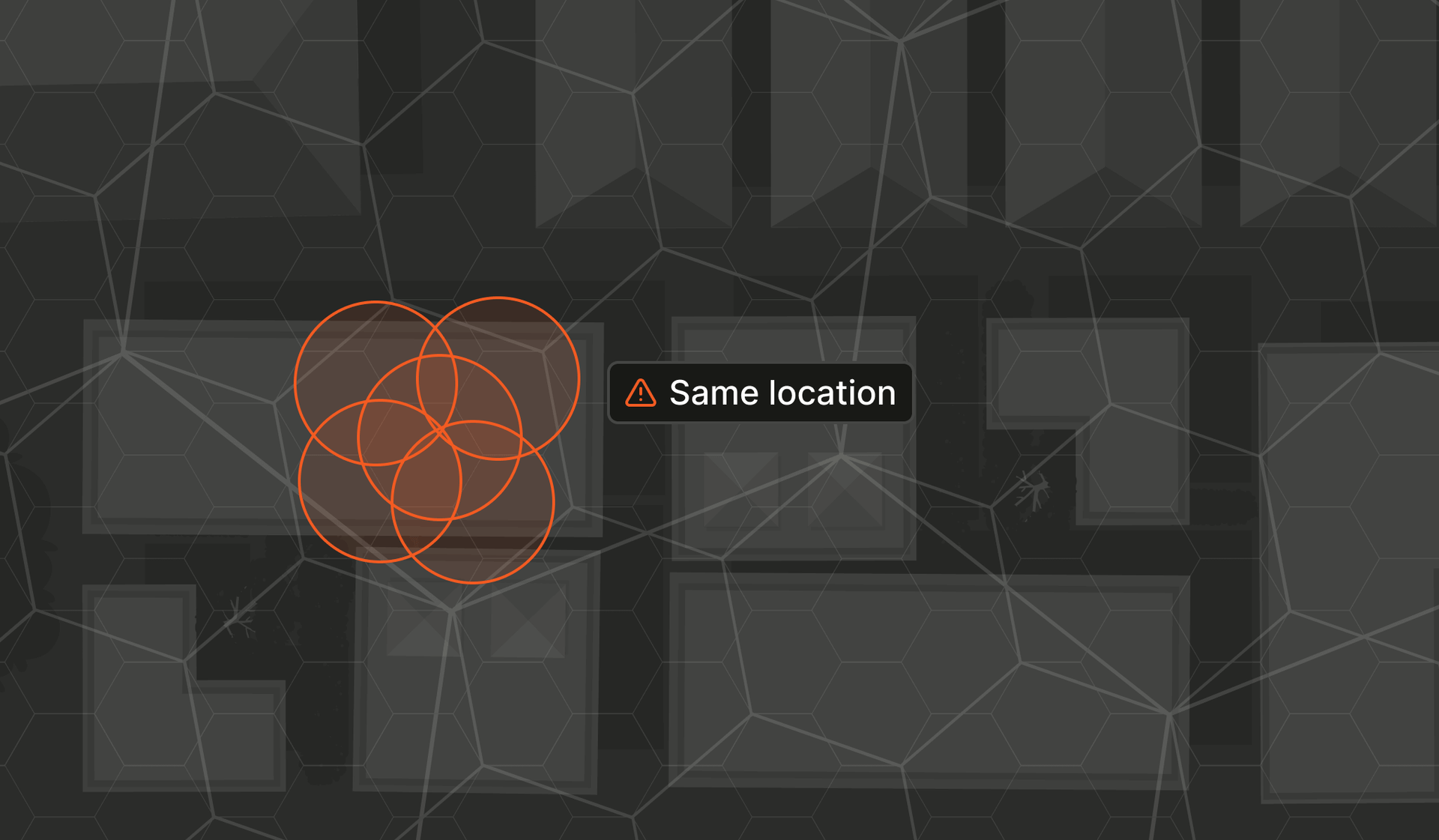
Proximity Detection addresses this by grouping devices into consistent, anonymized location cells based on real-world proximity. When several devices appear in the same cell, it becomes much easier to detect shared physical context. This surfaces signals that traditional methods miss, such as a spike of “new users” that are actually sitting in the same physical space.
So what exactly does a Proximity ID represent?
A Proximity ID represents a physical location without exposing raw coordinates (e.g., Ykq4nTqI4aa). While a Visitor ID identifies a specific browser or device, a Proximity ID abstracts that device’s location into a broader spatial unit that you can use to detect physical clustering.
Instead of returning latitude and longitude, we map each mobile device to a cell within a discrete global grid system. This creates a consistent and privacy-preserving way to determine when multiple devices are operating from the same place.
To do this effectively, we need a grid that divides the Earth into stable, gap-free zones. Each location must map to one and only one cell, and that cell should stay consistent. This structure smooths out location noise and gives fraud prevention systems something reliable to work with.
There are multiple ways to build a global grid, but we went with H3 because it offers a good balance between distortion, precision, and performance. H3 is a hexagonal global grid system developed by Uber that starts by wrapping the Earth in a 20-sided polyhedron, also known as an icosahedron (or a d20 if you’re into tabletop RPGs). Each face gets tiled with hexagons, then the whole thing is morphed into a sphere and projected onto the planet’s surface. From there, each hexagon subdivides into seven smaller ones, producing a clean hierarchical grid that can scale in precision. For Proximity Detection, we use a hierarchy with nine levels ranging from roughly 10 meters to about 20 kilometers.
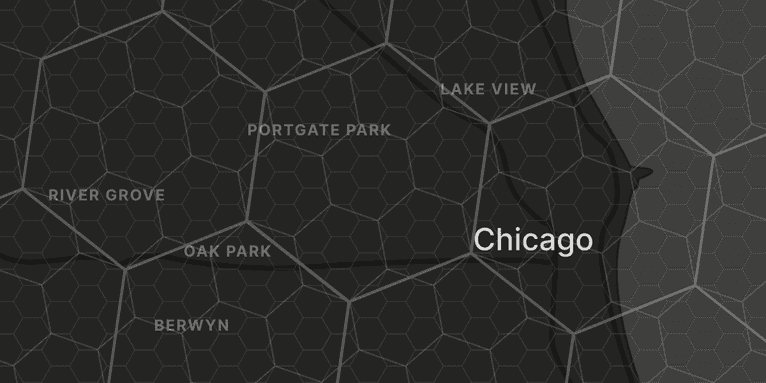
Hexagons are especially useful because they have six equal neighbors, making it easier to analyze nearby cells and detect physical clusters. Compared to square grids, hexagons minimize distortion and edge effects, leading to more consistent spatial relationships. And while a perfect hexagonal tiling of a sphere isn’t possible, H3 handles this by placing 12 pentagons at the vertices of the icosahedron over ocean regions to avoid interfering with real-world device traffic.
When we process a device’s location, we select the highest resolution the device’s accuracy supports and assign it to a single hexagonal cell. This cell becomes the basis for proximity analysis. Higher-accuracy data maps to smaller cells; lower-accuracy data maps to larger ones.
Proximity data is available through the same server-side channels as our standard identification results, such as the Server API, and includes three fields.
id: An encrypted, customer-scoped identifier for the hexagonal cell. The encryption and scoping ensures that proximity relationships are meaningful within just your environment, without exposing raw location data.precisionRadius: The radius of the hex cell (in meters) at the assigned resolution. This gives you a sense of how large the physical area is of the selected cell.confidence: A score from 0 to 1 indicating how likely the device’s true location falls within the assigned cell (versus a neighboring one). Higher confidence means greater accuracy in determining proximity.
Together, these fields give you a structured, privacy-aware way to detect when devices are operating from the same physical space, even when GPS and IP signals are noisy or misleading.
How Proximity Detection works in your app
To start using Proximity Detection, you’ll need the Fingerprint iOS or Android SDK version 2.10 or higher. You’ll need to enable location collection by setting the allowUseOfLocationData option when integrating the Fingerprint SDK. Additionally, the host application must also be granted location permission. The SDK never requests permission itself. That responsibility remains with your app, providing a predictable user experience that you fully control. Here’s how it works:
1. Collecting location data
If location permission is granted, the SDK captures the device’s coordinates and accuracy radius, then sends those values to the Fingerprint server. If permission isn’t granted, the SDK simply returns an empty proximity object without throwing errors. This behavior is non-blocking and won’t interfere with device identification or other Fingerprint signals.
2. Mapping to a proximity cell
Once location data is received, we determine the most precise hexagonal cell the device can be assigned to, based on its accuracy. This transforms a raw, often noisy location signal into a structured spatial unit that’s easier to work with. Note that devices with the same coordinates may receive different Proximity IDs if their reported location accuracies differ significantly. We also calculate a confidence score based on how well the device’s accuracy circle fits inside that cell and how close the estimated point is to the cell’s center.
3. Encrypting and scoping the ID
The selected cell identifier is then encrypted into a customer-scoped Proximity ID. This means the same physical location will yield different identifiers for different Fingerprint customers, preventing cross-customer correlation or reverse-engineering of geographic data. You get the ability to detect physical clustering with unguessable proximity identifiers.
4. Using the proximity signal
Once the Proximity ID is returned, you can use the Event Search API to identify other devices that share the same proximity cell. You can also query for matches across coarser resolutions, which is helpful when looking for broader behavioral patterns or looser groupings. This makes it easy to surface device farms, detect coordinated fraud, or flag cases when multiple accounts that seem unrelated show up in the same place.
A practical example using Proximity Detection
Promo abuse is a common challenge in mobile-first marketplaces, especially those offering generous sign-up credits or referral bonuses. Food delivery platforms are frequent targets. A typical abuse pattern might involve a single bad actor using a stack of cheap Android devices, cycling through factory resets or fresh app installs to repeatedly claim “new customer” discounts. Each device might look unique with a new hardware ID, a new session, and a new username, but in reality, they’re all operating from the same location.
This is exactly where Proximity Detection can expose the hidden link. Even if every signup appears to come from a different device with a different Visitor ID, they’ll still resolve to the same proximity cell if they’re used in the same physical space, like an apartment or hotel room. Since many apps in these industries already require location permissions for core functionality, adding proximity checks fits naturally into existing flows without introducing new friction for legitimate users.
Here’s an example of how you might implement a promo abuse detection workflow using the Proximity ID:
-
Capture proximity data at key moments
When a user signs up or attempts to redeem a promotion, collect the Proximity ID result alongside the Visitor ID and other Smart Signals.
-
Monitor recent promo activity by proximity cell
Maintain a log of promo redemptions, grouped by Proximity ID. You might also store the parent cell at a coarser resolution to account for location jitter across similar areas (e.g., different rooms in the same building).
-
Check for unusual concentration
On each new signup or redemption attempt, query how many promo redemptions have come from the same proximity cell within a recent time window (e.g., the last 24 hours).
-
Apply thresholds or trigger reviews
If that count exceeds your acceptable threshold, say, five signups from the same cell in a short period, you can block the promo, add friction (e.g., additional verification), or flag for manual review.
-
Use confidence scores to reduce false positives
Proximity results include a confidence score that reflects how reliably the device’s reported location maps to the cell. To avoid penalizing edge cases, set a confidence threshold to ensure only strong proximity matches trigger fraud logic.
By layering this type of location clustering check into your signup and promo workflows, you can catch abuse patterns that traditional GPS signals alone might miss. And this extends well beyond promo fraud. The same approach is effective for spotting coordinated gambling rings, identifying device farms generating fake ad clicks, catching one person operating multiple driver or courier accounts, flagging risky login patterns that originate from the same location, and much more.
Proximity Detection gives you a simple way to detect when supposedly independent devices behave like a single operation, hiding behind different hardware.
Add Proximity Detection to your fraud toolkit
Coordinated fraud often hides in plain sight, masked by noisy GPS data, misleading IP addresses, and a stream of seemingly unrelated devices. Proximity Detection gives you a new kind of signal: one that reveals the physical context behind mobile behavior, without compromising privacy.
More than just another data point, Proximity Detection can change how you think about physical space in digital fraud. It helps you detect patterns you couldn’t see before, whether it’s spotting promo abuse, exposing device farms, or flagging account networks that all just happen to check in from the same room.
If you’re ready to discover what traditional signals miss, get started with a free trial and explore the iOS and Android SDK documentation. Proximity Detection is easy to integrate, and it might just reveal the hidden layer your fraud model has been missing.
FAQ
A Proximity ID represents a device’s physical location, while a Visitor ID identifies the individual device. Fingerprint’s Proximity IDs help reveal when multiple devices are operating from the same physical place without exposing raw coordinates.
Proximity Detection is useful anywhere coordinated mobile fraud happens. It’s especially valuable in areas such as gig marketplaces like rideshares and food delivery, gambling, fintech, and any app facing multi-accounting, device farms, or promo abuse.
You can cluster events by Proximity ID, look for repeated activity from the same cell, and query related events through the Event Search API to flag device farms, coordinated fraud rings, or suspicious related activity.