Anti-detect browsers give fraudsters a purpose-built tool for looking like many different, ordinary users at once. A single operator can run hundreds of isolated browser profiles, each with its own manufactured fingerprint, and use them for multi-accounting, bonus abuse, ad fraud, and account takeover. If your fraud detection stack still leans on user agent strings and IP reputation, these browsers slip right past it.
This post explains what anti-detect browsers are, how they defeat traditional fingerprinting, why single-signal detection falls short, and what a layered detection strategy actually looks like in practice.
What are anti-detect browsers?
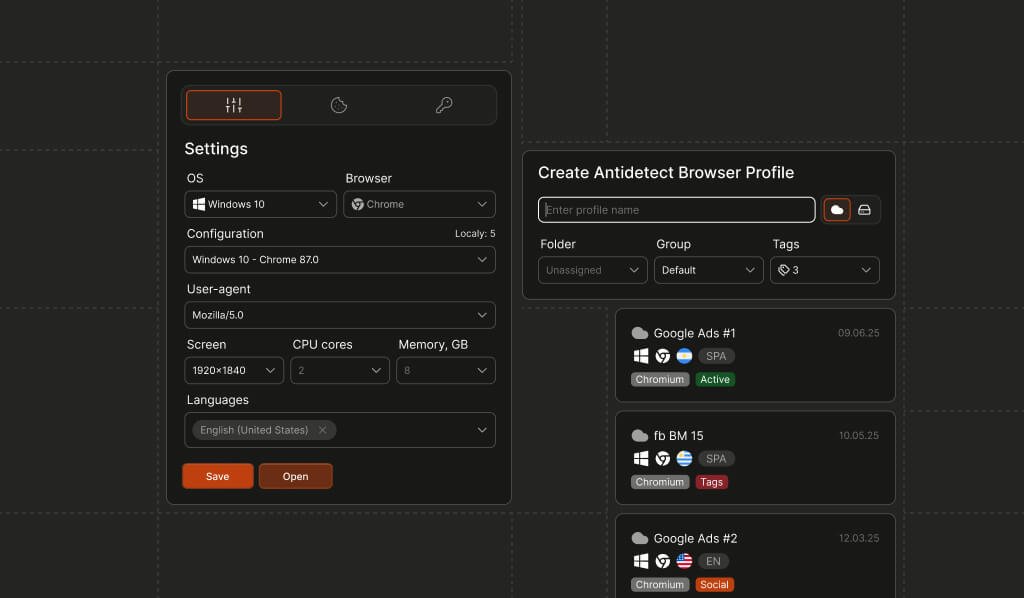
An anti-detect browser is a modified browser—usually built on Chromium or Firefox—designed to spoof or randomize the signals a website reads to identify a visitor. Instead of leaking one consistent browser fingerprint, the browser lets its operator create many separate “profiles,” each presenting a different combination of user agent, screen resolution, timezone, fonts, canvas output, WebGL renderer, and other attributes.
Some of the most popular commercial products in this category are:
- AdsPower
- Dolphin Anty
- Octo Browser
- GoLogin
They’re marketed to affiliate marketers and “multi-accounting” operators, but the same capabilities are attractive to anyone who wants to open dozens of accounts, evade bans, or abuse promotions while appearing to be unrelated people.
How anti-detect browsers work
Anti-detect browsers combine three techniques to stay hidden:
- Browser spoofing. They overwrite the values a site reads from the browser. At the simplest level, this is user agent spoofing or changing the output of selected signals collected from the browser. More advanced tools override JavaScript APIs so canvas, WebGL, audio, and font enumeration return controlled, per-profile values.
- Anti-fingerprinting. Rather than presenting one stable identity, each profile is engineered to look like a distinct, plausible device. Some tools lean on the same randomization ideas that privacy-focused browsers use to obfuscate signal output.
- Automation. Operators frequently drive these profiles with automation frameworks—Selenium and similar tools—to run actions across many accounts at scale.
The goal is to make each profile look like a fresh, legitimate visitor so that account limits, velocity rules, and reputation systems never connect the dots.
Why traditional detection falls short
Most legacy detection methods assume the signals a browser reports are honest. Anti-detect browsers break that assumption:
- User agent and header checks are trivial to spoof, so they no longer identify a device or its real configuration.
- IP reputation and geolocation get muddied by VPNs, proxies, and residential proxy networks that pair with anti-detect profiles.
- Basic browser fingerprinting can be confused with simple techniques that change the output of selected signals.
- Single-signal rules produce a binary verdict from one attribute, which a well-configured profile can defeat by presenting a common, unremarkable value.
The core problem is that any individual signal can be faked. Detection has to look at how signals fit together and how the visitor behaves over time.
What actually works: layered detection
Reliable detection treats anti-detect browsers as a consistency and behavior problem, not a single-check problem. A layered approach combines several independent perspectives so that spoofing one of them isn’t enough to pass.
1. Look for tampering and internal inconsistency
Spoofing one attribute is easy. Spoofing dozens of them so they all agree with each other is much harder. A profile might claim to be Safari on macOS while its rendering output, supported APIs, or font list point to Chromium on Windows. These contradictions are the most reliable tell that a browser is lying about itself.
Two complementary methods catch this. Statistical anomaly detection compares a browser’s signature to real-world traffic and flags combinations that are unusually rare. Anti-detect browser detection combines heuristic rules with machine learning models trained to recognize the patterns that known anti-detect tools leave behind.
Advanced device intelligence providers expose these methods as ready-made signals. Fingerprint’s Browser Tamper Detection, for example, returns an anomaly score for how rare a browser signature is and a separate machine learning score for how likely the request is to come from an anti-detect browser, catching tools like AdsPower, Dolphin Anty, Octo Browser, and GoLogin.
A useful property of this approach: even when a browser tampers with its signals, a stable visitor identifier can persist while the tampering itself is flagged. You see both that a returning visitor is present and that they’re trying to hide.
2. Detect automation and developer tooling
Because operators often script their profiles to run at scale, signs of automation are valuable evidence. Bot detection tools look for the traces automation frameworks leave in the browser environment, and they separate malicious automation from real users and well-known crawlers. A related check looks for a browser being controlled through the Chrome DevTools Protocol, which many automation libraries rely on under the hood.
3. Add network intelligence
Anti-detect setups usually route traffic through VPNs or proxies so each profile’s IP address matches its claimed location. That creates new opportunities for mismatches. VPN detection can compare the browser’s timezone with the location of its IP address, identify public VPN providers and anonymizing relays, and check whether the operating system the browser reports matches the one implied by its network traffic. Any one of these being positive is a reason to look closer.
4. Check device rarity and the environment
Some profiles are internally consistent but still describe a device almost nobody owns. Device rarity checks catch these by asking how common the full configuration is across global traffic, and flagging combinations that are extremely rare or have never been seen before. This complements tampering detection, which asks a different question: whether the configuration contradicts itself.
The environment matters too. Many operators run their profiles inside virtual machines such as VirtualBox, so virtual machine detection adds another layer. Signals that reveal incognito mode or privacy-focused settings round out the picture by showing when a visitor is deliberately obfuscating signals or posing as a new identity.
Layered detection beats single-signal rules
No single signal reliably identifies an anti-detect browser, which is exactly why fraudsters favor them. The strength of a layered strategy is correlation: a request that shows a rare browser signature, a VPN timezone mismatch, and a DevTools-controlled session is far more suspect than any one of those alone. At Fingerprint, we package these as individual Smart Signals—Browser Tamper Detection, Bot Detection, VPN Detection, Device Rarity Detection, and more—so a risk engine can weigh them together rather than acting on a single verdict.
Assume any signal your browser reports can be faked, and build detection that scores the consistency and behavior of a visitor across multiple independent layers. That’s what keeps anti-detect operators from blending in with your real users.
Ready to solve your biggest fraud challenges?
Install our JS agent on your website to uniquely identify the browsers that visit it.
Frequently Asked Questions
Are there legitimate use cases for anti-detect browsers?
Yes. Some researchers and QA testers use them to simulate different environments. However, the overwhelming use case in practice is fraud and abuse.