Summarize this article with
If you're already using Fingerprint, you've done the important first step of adding device intelligence to your fraud stack. But how you integrate it matters just as much as whether you integrate it. Client environments, whether web browsers or mobile devices, can be tampered with, and any security measure that relies purely on client-side logic can eventually be bypassed by a motivated attacker.
This post is for developers and security engineers who have Fingerprint running in production and want to make sure their implementation is as resilient as possible. We'll walk through layers where bad actors most commonly attempt to subvert fingerprinting and detection, what those attacks look like in practice, and the specific steps you can take on both web and mobile to close those gaps.
1. Device and browser-level tampering
The first place attackers go after is the environment itself. Before a single network request is made, a motivated fraudster may have already manipulated their device or browser to appear as someone they're not.
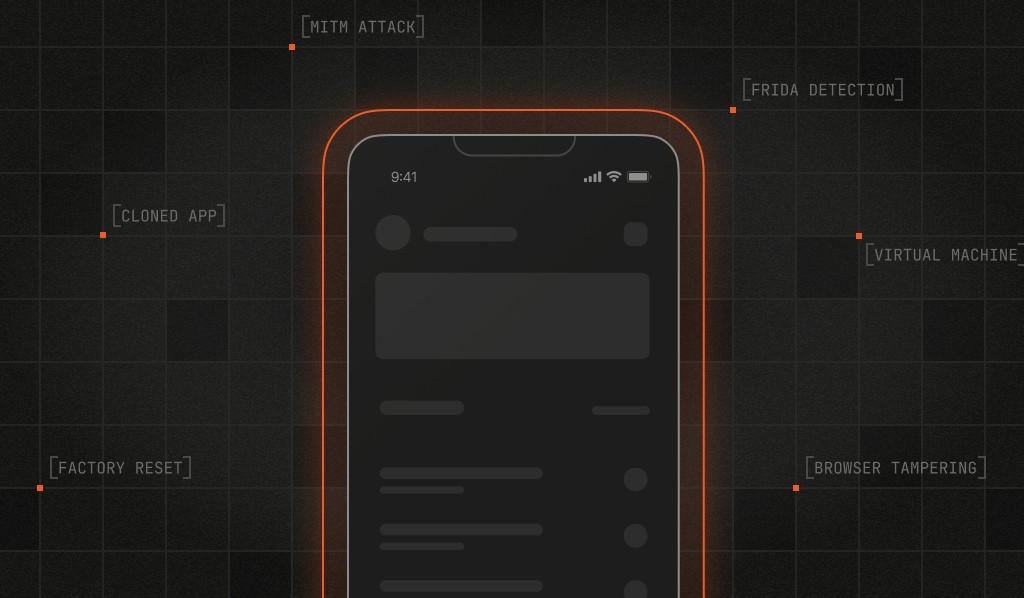
The goal at this layer is usually to appear as a "new" user: bypassing fraud checks, farming promotional discounts, or abusing referral programs at scale. On mobile, that means using jailbroken iOS devices or rooted Android devices to bypass OS-level security, running Android emulators, cloning apps to run multiple instances on a single device, or factory-resetting to wipe identifiers.
On web, the playbook looks a bit different. Attackers turn to "anti-detect" browsers designed specifically to spoof user agents and randomize browser signals. They may also run browsers inside virtual machines, open developer tools to inspect and manipulate requests, or use headless browsers or automation frameworks to script interactions.
How to mitigate it
The primary defense here is to use Fingerprint's Smart Signals to get actionable insight on device activity. How you respond to these signals will depend on your use case and risk tolerance, but a tiered approach works well: add friction or require additional verification for lower-risk signals, and block activity tied to higher-risk signals or signal combinations.
For example, on web, you might add a step-up challenge when developer tools are detected alongside VPN use:
const { developer_tools, vpn } = event;

if (developer_tools === true && vpn === true) {
  return { action: "challenge" };
}
On mobile, you might block a sensitive action when you detect app cloning on a recently reset device:
const { cloned_app, factory_reset_timestamp } = fingerprintEvent;

const twentyFourHoursMs = 24 * 60 * 60 * 1000;
const recentReset =
  factory_reset_timestamp > 0 &&
  Date.now() - factory_reset_timestamp < twentyFourHoursMs;

if (cloned_app === true && recentReset) {
  return { action: "block" };
}
2. Mobile application-level tampering
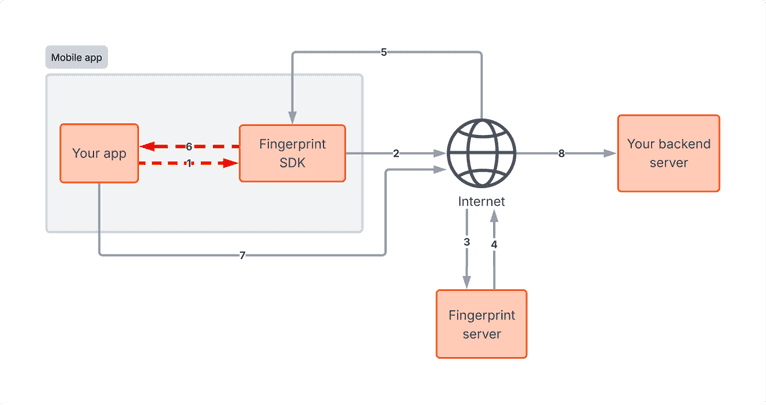
This attack layer is one of the hardest to defend against because it occurs within your application itself. The attacker modifies the app's code or memory so it actively lies to your backend, and from your server's perspective, the request looks completely legitimate. That's what makes it dangerous.
Using a dynamic instrumentation toolkit like Frida, an attacker can hook into the app at runtime and replace the methods that call the Fingerprint SDK, forcing the app to return a locally forged visitor ID. On iOS, this can even be done on non-jailbroken devices by embedding Frida into a re-signed version of the app, which only requires a developer or enterprise certificate.
How to mitigate it
Because you can't strictly trust requests sent directly from the client, your server needs to be the ultimate source of truth.
Tampering signals: Monitor the Tampered Request Smart Signal, which flags whether an identification request contains anomalous device attributes that couldn't have been legitimately produced by the Fingerprint SDK.
Code obfuscation: Make it harder for attackers to reverse-engineer your app and identify the methods that call the Fingerprint SDK. Obfuscating your app's code increases the cost and complexity of attempting this kind of tampering. The Fingerprint mobile SDKs are also obfuscated, making it significantly harder for attackers to analyze or tamper with their internals.
Sealed Client Results: Instead of passing a request ID to your backend and making a separate Server API call, receive the full encrypted identification event directly and decrypt it on your server. This reduces latency and ensures the payload can't be read or modified in transit.
Freshness and consistency: Check that the identification event is fresh to stop delayed replays, and that the IP address in the Fingerprint identification event matches the IP address making the HTTP request to your backend.
const {
  unsealEventsResponse,
  DecryptionAlgorithm,
} = require("@fingerprint/node-sdk");

const unsealedData = await unsealEventsResponse(
  Buffer.from(sealedResult, "base64"),
  [
    {
      key: Buffer.from(process.env.BASE64_KEY, "base64"),
      algorithm: DecryptionAlgorithm.Aes256Gcm,
    },
  ]
);

if (unsealedData.frida === true) {
  throw new Error("Frida detected. Possible runtime manipulation.");
}

if (unsealedData.tampering === true) {
  throw new Error("Tampered request detected.");
}
3. Network-level fraud: attacking traffic to Fingerprint
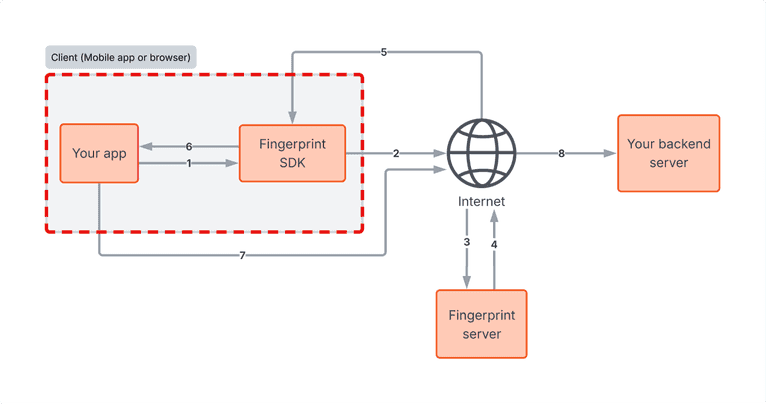
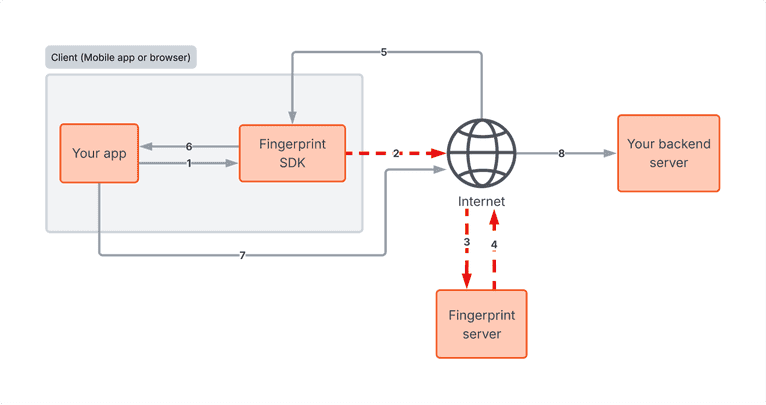
Even if a device looks completely legitimate, the data it sends can be intercepted or manipulated in transit between the client and the Fingerprint server. Your client application communicates across two separate network paths, each of which is a distinct attack surface. This section covers the first: traffic between your app and the Fingerprint server.
On this path, an attacker can set up a local server or proxy, reverse-engineer the encryption used in Fingerprint SDK traffic, intercept calls to the Fingerprint API, and respond with a crafted payload. The goal is to spoof a legitimate visitor ID to evade detection.
How to mitigate it
A few protections apply here, some handled by Fingerprint and some on your side.
Encrypted traffic: All traffic between the SDK and Fingerprint servers is encrypted beyond standard HTTPS, both in requests and responses, making it significantly harder to intercept or reverse-engineer.
Replay protection: If the same payload is sent to Fingerprint more than once, Fingerprint silently flags it by returning replayed: true in the Server API, Webhooks, or Sealed Client Results, without exposing any information in the client. Configure your backend to reject requests carrying this flag, and optionally blocklist the associated IP address.
MitM Smart Signal: Use Fingerprint's Man-in-the-Middle (MitM) Smart Signal to detect whether requests from your mobile app to Fingerprint's servers have been intercepted and potentially modified.
if (fingerprintEvent.replayed) {
  // Optional: Add fingerprintEvent.ip to an IP blocklist
  throw new Error(
    "Suspicious identification payload detected: Replayed flag is true."
  );
}

if (fingerprintEvent.mitm_attack) {
  throw new Error("MitM attack detected.");
}
4. Network-level fraud: attacking traffic to your backend
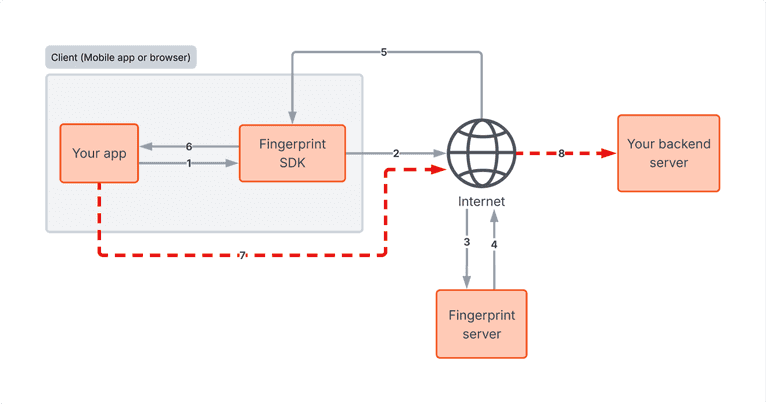
The second network path runs between your client and your own backend server, and it's your responsibility to protect it. An attacker can intercept a legitimate Fingerprint API response, such as a request_id or sealed result, and retransmit it later alongside a malicious payload to your server, effectively spoofing a trusted device's identity. Since Fingerprint has no visibility into traffic between your client and your backend, you need to protect against this yourself.
How to mitigate it
Since Fingerprint has no visibility into this path, all of these mitigations are on your side.
Duplicate request ID detection: Save all processed request IDs in a database and reject any you've seen before.
Sealed Client Results: Instead of passing a request ID to your backend and making a separate Server API call, receive the full encrypted identification event directly and decrypt it on your server. This reduces latency and ensures the payload can't be read or modified in transit.
Code obfuscation: Making it harder for attackers to reverse-engineer how your site or app communicates with your backend reduces the risk of them crafting requests that mimic legitimate traffic. If they can't easily identify how requests are structured and signed, the bar for a convincing replay or spoofing attempt goes up.
Strict error handling: If you use the Server API and it returns a 404 Not Found for a Request ID provided by the client, treat that 404 as an active tampering attempt, not a routine error.
Server API consistency: After using the request ID to fetch the full event from the Server API, compare the visitor ID in the response against the visitor ID the client originally sent. A mismatch is a strong signal of tampering.
Freshness and consistency: Check that the identification event is fresh to stop delayed replays, that the IP address in the Fingerprint identification event matches the IP address making the HTTP request to your backend, and that the origin of the Fingerprint identification request matches the origin of the request to your backend.
Certificate pinning: On mobile, certificate pinning can add an additional layer of defense by ensuring the app only trusts connections to known certificates, making it harder for an attacker to intercept traffic. This is worth exploring depending on your setup and security requirements.
// Reject duplicate request IDs
const existingEvent = await db.query(
  "SELECT * FROM fingerprint_events WHERE requestId = ?",
  [requestId]
);

if (existingEvent) {
  throw new Error("Replay attack detected: Request ID already used.");
} else {
  await db.query("INSERT INTO fingerprint_events (requestId) VALUES (?)", [
    requestId,
  ]);
}

// Verify the visitor ID from the Server API matches what the client sent
if (fingerprintEvent.identification.visitor_id !== clientSentVisitorId) {
  throw new Error("Visitor ID mismatch. Possible tampering.");
}

// Validate request freshness
const ALLOWED_REQUEST_TIMESTAMP_DIFF_MS = 5000;
if (
  Date.now() - Number(new Date(fingerprintEvent.timestamp)) >
  ALLOWED_REQUEST_TIMESTAMP_DIFF_MS
) {
  throw new Error("Event is too old. Possible replay.");
}

// Check that the identification request and the current request come from the same origin
const identificationOrigin = new URL(fingerprintEvent.url).origin;
const requestOrigin = request.headers.get("origin");
if (
  identificationOrigin !== requestOrigin ||
  requestOrigin !== "https://yourwebsite.com"
) {
  throw new Error("Origin mismatch. Possible replay attack.");
}
General security best practices
Layering is the core of a resilient implementation, and the most important layer to get right is how your client and backend work together. The device intelligence Fingerprint provides only becomes actionable when your backend is set up to retrieve it, validate it, and make decisions based on it.
Beyond that, there are a few additional good practices worth building in:
- Keep SDKs updated: Keep your SDK dependencies, including Fingerprint and any others you integrate, up to date. Fingerprint is constantly researching new techniques and adding new Smart Signals, so staying on the latest release also means you have the latest data to work with.
- Handle data carefully: Be deliberate about what data you expose to third-party SDKs, and enforce encryption for all data at rest and in transit.
- Evaluate multiple signals: Think about how signals can be combined rather than evaluated in isolation. For example, VPN usage alone isn't necessarily suspicious, but if you cross-reference it with the origin country and find conflicting information, that can tell a very different story.
- Actively monitor trends: Attack vectors evolve, so setting up your fraud rules once and walking away isn't enough. Actively monitor trends across Smart Signals, things like spikes in the tampering signal, Frida detection, or VPN usage, to catch coordinated attacks or new automated fraud methodologies before they cause significant damage.
Putting it all together
The attack layers covered here are not theoretical. They're the techniques that motivated fraudsters actually use against production applications, and the scenarios and mitigations in this post come directly from conversations with customers who have encountered them.
Getting the most out of Fingerprint means actively using the signals it provides, validating server-side, and treating your fraud rules as something that evolves over time. The good news is that none of the mitigations in this post require a full architecture overhaul. Most of them are targeted additions to your existing server-side validation logic, and each one raises the bar on its own. Together, they make your implementation significantly harder to bypass.
If you want to manage your fraud rules without touching your application code every time something changes, take a look at our Rules Engine. It lets you define conditions based on Smart Signals directly in the Fingerprint dashboard, and if you're on Cloudflare, Flow deployments let you enforce those rules at the edge before requests even reach your backend.
If you have questions about any of these recommendations for your specific setup, reach out to our team. We're happy to help you think through how these practices apply to your integration.
FAQ
A replay attack occurs when a legitimate data transmission is captured and then re-sent maliciously to deceive a system. A replay attack in the context of Fingerprint can happen at two levels. Payload replay is when an attacker resends a captured Fingerprint SDK payload to the Fingerprint API. Fingerprint detects this and flags it with a “replayed: true” field in the identification event data. Another form of replay is when an attacker retransmits a legitimate Fingerprint response, such as a request ID or sealed result, to your own backend.
Sealed Client Results deliver the full Fingerprint identification event as an encrypted payload that you decrypt on your server, rather than making a separate Server API call. This reduces latency, ensures the payload can't be read or modified in transit, and is an effective way to protect against tampering.
Fingerprint provides several Smart Signals and data points specifically for this: the Tampered Request Smart Signal flags anomalous device attributes, the MitM Smart Signal detects intercepted mobile traffic, the Frida signal flags the presence of runtime instrumentation tools, and the “replayed: true” flag identifies when a payload has been captured and resent to the Fingerprint API. You should also validate request freshness and ensure that the visitor IDs returned by the Server API match those the client originally sent.
App-level tampering is when an attacker modifies a mobile app's code or memory at runtime so it actively lies to the backend. Because the request originates from what looks like a legitimate app, standard network-level defenses don't catch it. Tools like Frida make this possible even on non-jailbroken iOS devices.