What is cross-site tracking?
Cross-site tracking is the practice of recognizing the same device across multiple, otherwise unrelated websites by using a shared identifier — turning separate visits into one continuous, linkable trail of behavior.
Every time you move around the internet, a profile of you is being created. Not by one site, but by dozens of companies you've probably never even heard of.
They're stitching together a picture of where you've been, what you looked at, how long you lingered, and what you almost bought but didn't. You'll never interact with most of them directly. You just unknowingly carry their observers around from page to page, like lint on a sweater.
It's easy to wave this off. So what if some ad network knows I looked at running shoes? But the data doesn't stay in the world of advertising, and it doesn't stay anonymous. It gets bought, sold, merged, and breached.
The same infrastructure built to target ads has been used to de-anonymize people, set different prices based on who a retailer thinks you are, and feed government surveillance. The profile being built as you browse is more durable, more detailed, and more widely shared than the "targeted ads" framing suggests.
In this post, we'll dig into the raw materials behind cross-site tracking, the handful of things about you and your device that make persistent identification possible in the first place. Then we'll get into how those raw materials get assembled into the machinery that follows you around. And then, share some tips and techniques you can use to make yourself harder to follow.
While total invisibility online is an art form, most of the tools to fight cross-site tracking are within your reach.
The three building blocks of persistent identification
Before anyone can follow you around the internet, they need a way to recognize you when you show up. At first, this is just "you," as in the same browser or device that visited a site, not necessarily your name or any personal information. But that recognition is the foothold. Once a tracker can reliably identify you, it can start attaching everything else it learns to that identifier.
There are really only three places to find the raw material to recognize you in the first place, and almost every tracking technique boils down to using one or more of them.
Storage. A site asks your browser to hold onto a little piece of data, and your browser, being agreeable, does. The next time you show up, that data is still there, and now you're recognized. Cookies are the famous example, but the same idea shows up in localStorage, IndexedDB, and a handful of other browser storage mechanisms. The issue, at least from a tracker's perspective, is that browser storage is fragile. You can clear it, block it, or browse in a mode that throws it away when you're done. Storage-based identification only lasts as long as the storage does.
Network. Every request your device makes carries your IP address, because the response has to get back to you somehow. That IP is a halfway-decent identifier on its own. It often points to a specific household or, on mobile, follows you around for a while before it changes. It's not precise, plenty of people can share one, and it shifts over time, but it's always there, and you can't simply turn it off the way you can refuse a cookie. To make it stop identifying you, you have to actively route around it.
Browser and device attributes. To render pages correctly, your browser volunteers a steady stream of details about your setup: which browser and version you're running, your operating system, screen resolution, time zone, language, installed fonts, and how your specific hardware renders graphics, among many other things. Any one of these is unremarkable and shared by millions of browsers or devices. But stack enough of them together, and the combination starts to get more and more rare, rare enough to pick one browser out of millions. Collecting these attributes and turning them into an identifier is called browser fingerprinting, and unlike storage, there's nothing sitting on your device to delete. The fingerprint is just based on what your browser looks like.
The thing to know is that these three rarely work alone. Storage, network, and browser attributes each have weak spots, but used together, they cover for each other. Clear your cookies, and a tracker might still recognize your IP. Change your IP, and the fingerprint is still there. Stack all three, and you get something far more durable than any one of them on its own.
On its own, being recognized as "the same browser that visited last Tuesday" is pretty harmless. Recognition is just a building block, and it has plenty of uses unrelated to surveillance. What can turn it into a privacy nightmare is what gets built on top of it: a profile, assembled from everything attached to you over time, fed by an identifier that doesn't stay put on one site.
The same handful of companies have their hooks in thousands of sites at once, which means the "you" they recognize in a news article can be matched to the "you" on a shopping site, a travel booking, or a symptom checker. All while quietly picking up your real name and personal information to go with it.
So how does information actually get passed from one site to another to build that file? That's where the real machinery comes in.
How cross-site tracking gets built
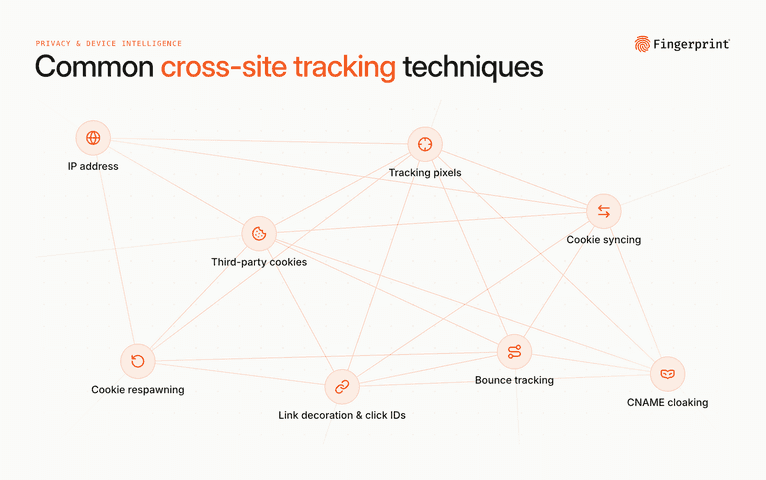
Recognition gives you an identifier. Cross-site tracking is what happens when a bunch of sites quietly agree to use the same one. Here's how that actually gets pulled off.
IP address. The original cross-site identifier, and the crudest. For a long time, your IP was a decent way to recognize you, since it often stuck to your household or followed your phone around for a while, and any site you visited could see it without doing anything clever. The trouble for trackers is that it was never precise. Whole households and offices could share one, mobile IPs shift around, and a VPN can easily change it. As IPv4 addresses ran low and providers started cramming more and more users onto each shared address, it has only gotten more opaque. It still works as an input signal that sharpens everything else, and when paired with the techniques below, the picture becomes much clearer.
Third-party cookies. This is the technique that built the ad industry. Most cookies are first-party, set by the site you're actually visiting, and they do helpful things like keep you logged in or remember what's in your cart. A third-party cookie is different: A site you visit loads something from another domain — an ad, a "like" button, an invisible pixel — and that other domain gets to set its own cookie in your browser. Now imagine that same other domain has a presence on thousands of other sites. Every time you land on one of them, your browser helpfully hands back the cookie it set earlier, and the tracker knows it's you again. As you hop from a recipe blog to a news site to an online store, the tracker sees a single continuous trail with the same ID stamped on every step. The cookie was set by a third party, hence the name, and that third party is the same across all of those sites, which is the whole trick.
Tracking pixels. A tracking pixel is the delivery mechanism for a lot of this. It's usually a 1x1 transparent image, or just a snippet of code, embedded on a page for the sole purpose of phoning home. The most widely deployed example is the Meta Pixel, which sits on a huge chunk of the web. When you load a page that has it, your browser quietly reports back to Meta: This browser viewed this page, added this to the cart, started this checkout, and has these cookies and this network data. Meta Pixel tracks user activity through about 20 default and standard events such as PageView, Purchase, and AddToCart. One study found its automatic event tracking, which collects things like button clicks and page metadata, was adopted by up to 98.4% of the websites running it, mostly because it's on by default. The host site gets web analytics. Meta gets to connect your behavior in a random store to the account where it already knows your name.
Cookie syncing. Here's a problem trackers have: Each one sets its own cookie with its own ID, and those IDs don't necessarily match. The ad network that knows you as ABC123 and the data broker that knows you as XYZ789 are looking at the same person without realizing it. Cookie syncing is the backroom handshake that fixes this. When you load a page, the trackers on it quietly ping each other and swap notes, "my ABC123 is your XYZ789," so they can merge what they each know about you. It's the mechanism that turns a bunch of separate watchers into a shared surveillance network, and it happens in milliseconds, invisibly, while the page is still loading.
Cookie respawning. This is the one that explains why just clearing your cookies often doesn't do what you'd hope. The classic version of cookie respawning stashes a backup copy of your ID somewhere that "clear cookies" tends to miss, like localStorage or IndexedDB, and when you delete the main cookie, a script notices it's gone and quietly regenerates it from the backup with the same old ID. The deleted cookie comes back from the dead, which is why these are sometimes called evercookies. The most notorious hiding spots, like Flash storage, are gone now. Browsers have gotten better at clearing these places along with cookies, but the version that still works reliably doesn't store a backup at all. A tracker can recognize your browser by its attributes, that third building block from earlier, and look the ID right back up. Research from 2025 showed this directly: When researchers altered a browser's fingerprint, the cookies that returned changed too, indicating the fingerprint was really the one doing the identifying.
Link decoration and click IDs. Ever notice a URL stuffed with a bunch of stuff after the question mark? Something like ?fbclid= or ?gclid= followed by a long string of gibberish? That string is a click identifier used for tracking. When you click an ad or a link, the destination gets your identifier baked right into the address, so the new site knows exactly who sent you and can tie this visit to your existing profile. As browsers clamp down on third-party cookies, link decoration is becoming a stronger identifier. A cookie rides along automatically, but when that's blocked, the ID has to travel some other way. So they pass it hand to hand through the links you click.
Bounce tracking. A sneakier cousin of link decoration. Instead of just tacking an ID onto the link, the link quietly routes you through the tracker's own domain before sending you on to where you meant to go. You click what looks like a normal link, your browser makes a pit stop at the tracker's site for a few milliseconds, and then lands on your destination. You never notice the detour, but the tracker's domain puts itself in a first-party position that lets it set and read first-party cookies, the kind browsers are far less likely to block. It's a way to get third-party tracking done while wearing a first-party hat.
CNAME cloaking. This one is less about a new identifier and more about dodging the defenses browsers have built. Browsers have grown aggressive about blocking third-party cookies, so some trackers have found a way to be first-party instead. The site sets up a subdomain, something like metrics.example.com, that appears to belong to the site you're visiting. But this subdomain, via a DNS record, actually points to a tracking company's servers. Your browser sees a first-party subdomain and extends first-party trust, and the tracker uses that to collect cookies and quietly forward identifying data off to its own servers, the kind it would have been blocked from setting if it had asked directly. Routing through a subdomain isn't inherently shady; plenty of sites do it for their own analytics or to keep their own tools from being blocked. The problem is when a third party uses it to build a profile on you and link your activity on this site to everywhere else they've seen you.
All of these techniques get you recognized, but recognized as a string of characters, not a name. Two things turn the identifier into an actual identity.
The first is when you simply hand it over: You log in, type your email at checkout, enter your phone number, and now the profile has a verified, real-world person attached to it. Your email is especially useful here, since many people use the same one almost everywhere, which makes it a stable key that ties your activity together across sites that could never share a cookie.
The second is probabilistic inference. If a laptop and a phone keep showing up on the same home IP every evening with similar browsing habits, a tracker's models will bet they belong to the same person and merge the two, no login required. Ad companies build what are called identity or cross-device graphs, linking your phone, laptop, and tablet into a single profile, so the "you" on your laptop and the "you" on your phone get recognized as the same person.
The main theme across all of these identification methods is that each one is a way to carry a single identifier from one site or device to the next, linking your separate visits into one continuous trail. And they're increasingly built to survive the protections meant to stop them.
But here's the good news: Those protections, the ones trackers are working so hard to dodge, are real. And you have more of them at your disposal than you might think.
How to protect yourself from cross-site tracking
It's quite hard to become truly invisible online and avoid cross-site tracking completely. But you can go from trivially easy to identify to genuinely hard to recognize with just a few key changes.
Almost every defense is chasing the same goal: Making sure you can't be reliably recognized as the same person from one site to the next.
One way to do this is to blend in: Look so much like everyone else that there's nothing distinctive to lock onto. The other is to stay in motion: Change what you present often enough that no stable identifier ever forms. Clear your storage so cookies don't persist, route around your IP so it can't anchor you, and present a browser that either matches the crowd or shifts over time.
The real sweet spot is doing both at once. A common browser configuration, paired with rotating network paths and non-persistent storage, blends you into the crowd while leaving nothing stable enough to anchor to.
Here's the trap, though. Doing this yourself, by hand, tends to backfire. Pile on enough rare extensions, obscure settings, and a niche operating system in the name of privacy, and you don't disappear into the crowd; you become the most distinctive person in it. A browser loaded with 15 privacy add-ons running on an unusual setup is often easier to spot, not harder. The approaches that actually work are the ones where the blending or the shifting is engineered for you and shared across a large group of people, so you're one of many rather than a snowflake.
With that in mind, here are some options, roughly from least to most effort. Some are a complete setup on their own, while others are layers you can add on top.
iOS Safari with iCloud Private Relay, in Private Browsing. For most people, this is the strongest privacy-to-effort ratio available. It covers all three building blocks at once, with some extra defenses on top. Private Browsing wipes cookies and storage when you close it, and Intelligent Tracking Prevention blocks third-party cookies outright and shuts down bounce tracking, so there's nothing for a tracker to plant or reuse across the web. iCloud Private Relay routes your traffic through two separate relays so that no single party, not the sites you visit, not your network provider, not even Apple, can see both who you are and what you're looking at, and the IP you present is shared by a pile of other Apple users. And Safari actively fights fingerprinting: It scrambles some of the signals trackers read, like canvas, audio, and WebGL output, with injected noise, and flattens others, like your screen size, to generic values. Both make it harder to pin a stable identifier on you.
Firefox and Brave. If you're not in Apple's world, these are the strong mainstream picks, and both block a lot of this out of the box. Firefox's Total Cookie Protection, on by default, gives each website you visit its own separate cookie jar, so a tracker embedded on two different sites can't connect the cookie it sets on one to the cookie it sets on the other. Recent versions have also added fingerprinting defenses that Mozilla says cut the number of trackable users in half. Brave blocks trackers and third-party cookies aggressively by default and fights fingerprinting by randomizing the signals trackers read, so your fingerprint changes from one session to the next. Turn either one to its stricter setting and you also get protections against bounce tracking and click-ID-laden URLs.
One good content blocker. Whatever browser you land on, a single reputable content blocker is the highest-leverage add-on you can run, because it stops trackers, pixels, and ad scripts from loading in the first place. No script, no fingerprint, no pixel phoning home. uBlock Origin is the consensus pick on Firefox, and uBlock Origin Lite is the version that works within Chrome's newer extension rules. Brave and Safari already have strong built-in blocking, so you mostly don't need to add anything there, but AdBlock Pro for Safari makes it more robust. The key word here is one content blocker. This is the place to remember the entropy trap: A single well-maintained blocker makes you safer, but a tower of overlapping privacy extensions just makes you more distinctive and more easily identifiable.
Keep your logged-in life separate. Of everything here, this is the one that might matter most, because a login is the only identifier you hand over voluntarily, and it's a perfect, verified match. No amount of tracking defense helps if you're signed into Google or Facebook on the same browser or device you use for everything else. The fix is to use private/incognito modes or to use separate browser profiles, the feature most browsers have for running fully independent setups, each with its own cookies and logins. Keep one profile signed into the accounts you actually use, Google, your email, your bank, and do your general browsing in a separate profile where you stay logged out. Because the logged-in identity is what staples a real name to everything else, walling it off keeps your casual browsing from getting tied back to the real you so easily. Firefox offers Multi-Account Containers that do a lighter version of this inside a single window, letting you quarantine a logged-in account, your Google session, say, to its own color-coded tabs so the rest of your browsing stays separate from it. It won't stop tracking on its own, but it breaks one of the easiest links trackers rely on.
VPNs, with a caveat. A VPN masks your IP address by routing your traffic through its servers, which genuinely helps with the network building block, especially on public Wi-Fi. But it's worth being clear about what a VPN does not do: it doesn't touch your cookies, and it doesn't change your browser fingerprint. The site you visit still sees the same browser attributes it always did. A VPN swaps one of the three building blocks and leaves the other two untouched, so on its own it's a partial measure, not a force field. The marketing tends to oversell this. It's a useful layer, but not a solution by itself.
Mullvad Browser and Tor. If you need more protection than a mainstream browser offers, this is the next step up. The Tor Browser routes your traffic through multiple relays and, just as importantly, ships a browser deliberately engineered so that every Tor user looks alike, which is uniformity taken to its logical extreme. Mullvad Browser is an interesting middle option: It's the Tor Browser's anti-fingerprinting approach without the Tor network, so you get that same "look like everybody else" benefit on the regular internet, typically paired with a VPN. There is a real tradeoff, though. Tor is slower, and plenty of sites treat its traffic with suspicion or block it outright. Even here, you're raising the difficulty of tracking, but not dropping to zero. A determined script may still get a partial, lower-confidence read even against a hardened setup.
There's an even-more hardcore tier beyond this, from LibreWolf's hardened-by-default setup to aggressive script blocking with NoScript or a full arkenfox configuration, all the way to isolating browsing activity in separate virtual machines. But each of these cause real friction, and past a point, the unusual setup starts working against you.
None of these makes you invisible, and stacking all of them quickly becomes impractical. Most people don't need to fully disappear online, and honestly, the Safari setup or a privacy-focused browser gets most people most of the way there.
If you want to see where you actually stand, EFF's Cover Your Tracks and PrivacyTests.org both let you test your browser in a single click. You can see how unique your browser is and whether your blockers are working.
So what about Fingerprint?
You might be thinking, what is a company literally named Fingerprint doing writing a post like this? The answer is that we believe it is critical to understand these technologies, their differences and nuances, and how they are used.
The same fingerprinting that lets an ad network track you across sites also lets a bank stop an account takeover before it drains your life savings, or a social platform keep a banned abuser from coming back under a new account. What matters is what you do with the identifier.
Cross-site tracking needs an identifier that's shared across many sites: The third-party cookie that's the same everywhere it sits. Fingerprint's visitor ID is more narrow: It is scoped to a single customer's environment, so if two customers identify the same browser or device, they get two completely different IDs.
We also don't collect your name, email address, or any other personal information. Our data isn't sold, and we aren’t an advertising product. The value our customers get comes from signals that point to risk — like signs that a browser has been tampered with or is automated — which flag potential fraud without needing to know who you are or if you recently were shopping for sweaters.
Protect yourself out there
You can't make yourself invisible online, and chasing that is a good way to drive yourself a little crazy. The realistic goal is smaller and more achievable: Make it so the tracking machinery that's out there simply can't get a stable read on you.
The good news is that the highest-impact moves are the low-effort ones. Pick a browser that fights for you instead of against you, run one good content blocker, keep your logged-in life walled off from everything else, and every so often, test where you actually stand.
You don't have to do all of it, and you definitely don't need 15 extensions and a custom-made setup that makes you stand out more than you blend in. A couple of solid choices cover most of the distance.
Frequently Asked Questions
Does clearing cookies stop tracking?
Not on its own. Clearing cookies removes one type of identifier, but trackers can recognize you again through your IP address or your browser fingerprint. It helps, but it's not enough by itself.
Does incognito or private mode prevent tracking?
Only partly. Private mode, on its own, keeps your browsing history off your device, which is useful on a shared computer, but it doesn't hide your activity from the sites you visit. However, losing the cookies from the standard session and only having the cookies scoped to the private session eliminates a valuable identifier for trackers.
Does a VPN stop cross-site tracking?
Only partly. A VPN masks your IP address, which genuinely helps, especially on public Wi-Fi. But it doesn't touch your cookies or change your browser fingerprint, so sites can still recognize you through them. It's a useful layer, not a complete solution.
What is browser fingerprinting?
It's a way of identifying you based on the details your browser reveals to render pages: your operating system, screen resolution, time zone, fonts, how your hardware draws graphics, and more. Any one detail is common, but the combination can be rare enough to single out your browser, and unlike cookies, there's nothing stored on your device to delete.
What's the easiest way to protect myself from cross-site tracking?
Pick a privacy-respecting browser and let it do the work. On Apple devices, Safari with iCloud Private Relay in Private Browsing is the strongest option for the effort. On other platforms, Firefox or Brave block most of this by default. Add one good content blocker like uBlock Origin, and keep your logged-in accounts separate from your general browsing. Most defenses either make you look identical to many other users or constantly randomize what your browser reveals so no stable identifier ever forms.
Can you be tracked across websites with Fingerprint?
No. Fingerprint's visitor IDs are scoped to each customer's workspace, so two different customers using Fingerprint get two completely different IDs for the same browser or device. There's no exposed shared identifier to link your activity across unrelated sites, which is the thing cross-site tracking depends on.