On October 29, attackers took about $6.3 billion from the Binance crypto exchange (at least that is the amount as of this writing). According to Reuters, they used a compromised laptop and malware to manipulate the system Binance uses to approve transactions, allowing them to move funds without going through the normal approval controls. Blockchain analytics firms have linked the attack to North Korea, and Elliptic called it likely the largest single theft of any kind in history.
Binance says customer funds are safe and that it will cover the losses itself. It paused withdrawals and said it expected to turn them back on within 48 hours. Stablecoin issuers Tether and Circle have also frozen more than $2 billion of the stolen funds between them.
To be clear, this wasn't an attack on customer accounts, and device intelligence isn't built to stop someone from manipulating or exploiting an exchange's internal systems. But the hack is only part of the story, with ripple effects still to be seen in the weeks ahead.
Big exchange incidents like this one are usually followed by a wave of scams aimed at that exchange's customers, and staying ahead of that kind of fallout is something fraud teams can do with device intelligence tools like Fingerprint.
We've seen this before with Bybit
In February 2025, North Korea stole approximately $1.5 billion in virtual assets from Bybit, according to the FBI, the biggest crypto theft in history at the time.

What happened next is a good preview of what to expect now. While North Korea might have taken the money, completely separate groups of scammers went after Bybit's customers in the aftermath of the hack.
Security firm BforeAI tracked 596 suspicious domains in the three weeks after the heist, and many of them pretended to be a recovery service or a "Bybit Help Center" for people worried about their funds. The goal of these spoof sites appears to have been getting victims to enter their Bybit passwords. Even the domain names followed the panic, pairing spoofed Bybit names with words like "refund," "recovery," "wallet," and "check." Security firm Bolster found fake Bybit login pages being used to steal credentials and take over accounts.
And Bybit isn't the only example:
- After a 2023 breach at Kroll, the claims agent for the FTX bankruptcy, phishing emails pretending to be FTX told people they were eligible to withdraw their assets.
- After Coinbase's 2025 data breach, attackers used stolen customer data to pose as Coinbase and trick people into handing over their crypto, and Coinbase estimated it would spend $180 million to $400 million on remediation and customer reimbursements.
Binance is already getting ahead of it. The exchange has warned customers to stay cautious of scams and to avoid unofficial links, messages, or requests for account information.
What to expect this time
Based on those past incidents, here's what the scams after the Binance hack will probably look like:
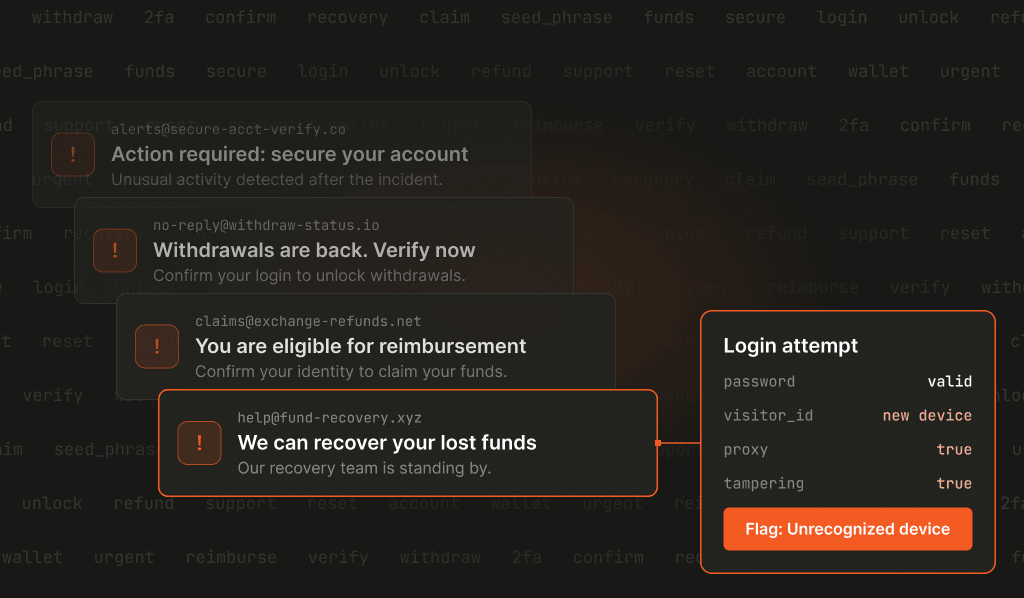
- Fake security alerts. Emails, texts, and social posts telling people to "secure your account" or "confirm your identity to stay eligible for reimbursement," all linking to a fake login page. Binance users were already getting fake "security alert" texts with links asking them to verify immediately before the hack.
- "Withdrawals are back" messages. Since Binance really did pause withdrawals, a message saying they've reopened and you need to verify first is going to look pretty believable. Security researchers are already warning about fake announcements that withdrawals reopened.
- Fake recovery services. Scammers posing as investigators or support agents who offer to retrieve lost funds for a fee or a seed phrase.
- Credential stuffing everywhere else. Around 94% of people reuse passwords across accounts, and attackers use automated tools to test stolen credentials across other sites. Credentials stolen through Binance-themed phishing will get tested against other exchanges, wallets, and fintech apps.
At the same time, real users are doing a lot of the same things attackers do. They're logging in from new devices, resetting passwords, changing security settings, and moving funds as soon as they can. So flagging every new device isn't going to cut it.

Phishing steals credentials, not devices
When someone falls for one of these phishing schemes, the attacker gets their username and password, and sometimes a one-time code or session token. Adversary-in-the-middle phishing kits relay the real login and steal the authenticated session cookie, which the attacker can then load into their own browser. What they don't get is the person's actual device.
So when the attacker logs in, they're doing it from their own browser or phone, one that has never been used with that account before. From there, it's usually the same playbook: take over the email, reset the password, change the MFA method, add a new withdrawal address, and start moving funds.
If you can tell that a login with the right password is coming from the wrong device, you can stop that playbook before any money moves.
How to recognize risky credential activity with device intelligence
Fingerprint's visitor ID is derived from 100+ browser and hardware signals, and doesn't rely on IP addresses or cookies. That means you can recognize a returning device even after cookies are cleared or the IP address changes, and you can see when a login with valid credentials is coming from a device that has no history with that account (and may be a fraudster exploiting those credentials).
Smart Signals give you more context about the device making the request:
- Bot detection flags bots, AI agents, and automated browsers, which is how credential stuffing runs at scale.
- Proxy detection tells you if a visitor's IP address belongs to a public or known residential proxy.
- Browser tampering detection catches visitors using antidetect browsers or manually altering their browser configuration to evade detection.
Use these alongside the visitor ID and the account's history to decide which requests get extra verification.

Six actions for fraud teams to take over the next few weeks
If you run an exchange, wallet, or fintech app, here's what I'd put in place while this is in the news.
1. Tie sensitive actions to known devices. Logging in from a new device might be totally fine. Changing the account email, removing two-factor authentication, adding a withdrawal address, and making a big withdrawal from that new device in the same session is not. Require step-up verification or add a short hold when high-risk changes come from a device you don't recognize. (Coinbase did something similar after its breach, adding extra ID checks on large withdrawals for affected accounts.)
2. Watch how devices and accounts connect. One device trying to log in to a bunch of different accounts points to credential stuffing or account testing. One account suddenly getting accessed from several new devices points to stolen credentials.
3. Keep bots off your login and password reset pages. Credential stuffing has a low success rate, so it only pays off at high volume. Bot detection on those endpoints takes that volume away.
4. Don't punish every new device. Plenty of real users are on new devices right now. Use device history and Smart Signals to tell the difference between someone on a new phone and an attacker on a tampered browser behind a proxy.
5. Tighten your rules for a few weeks, then relax them. The risk window after a big incident doesn't last forever. Lower your thresholds for step-up checks on sensitive actions for a few weeks, then look at what you caught and go back to normal.
6. Remind users what you'll never ask for. Let them know through official channels that you'll never ask for a seed phrase, a password, or a fee to recover funds. Coinbase did this after its breach, reminding customers that a real employee would never ask for their password, 2FA codes, or seed phrase. It won't stop every phish, but it makes the scams easier to spot.
Brace for the second wave
Nothing customer-facing was going to stop the Binance hack itself. But the phishing and account takeover attempts that follow are going to hit login pages and withdrawal flows for many regular customers around the world.
For fraud and security teams in the industry, it's important that you can recognize the devices behind those requests, so you can stop the attackers who show up with the right password on the wrong device.
Want to try it out? You can get started with Fingerprint's free tier, or reach out to our team to talk through account takeover protection for your platform.
Ready to stop account takeovers?
Fingerprint recognizes the device behind every login, so you can catch attackers with the right password on the wrong device.