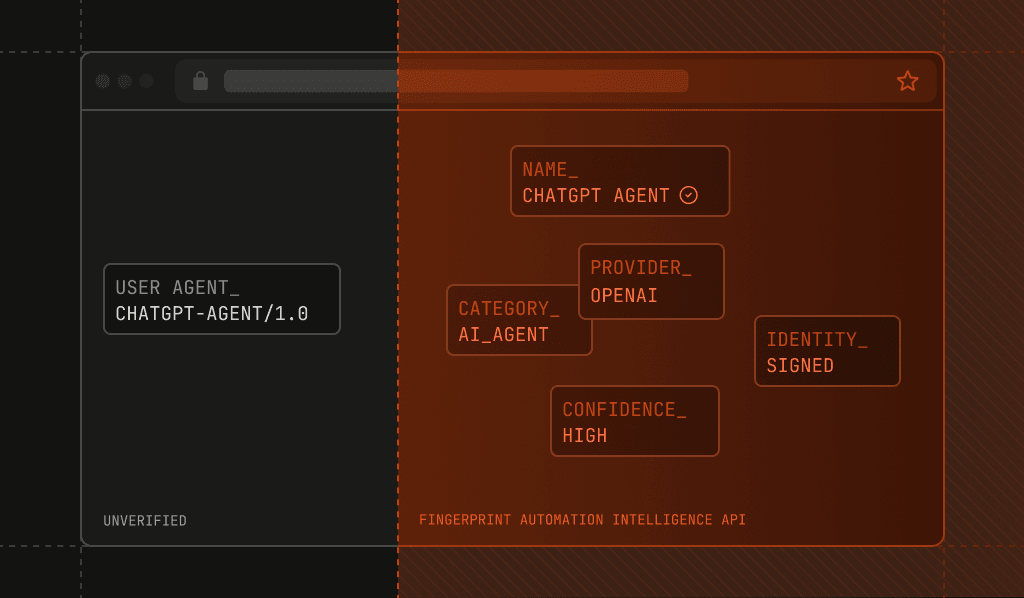
You shipped an MCP server. Tool calls are coming in. Now, you want to answer a simple question: Which AI tools are actually calling it?
For most teams, the honest answer is "we're not sure." You can see request volume, tool names, and latency. What you can't see is whether that traffic is Claude Code running on a developer's laptop, a Cursor session, a cloud-hosted agent runner, or something impersonating one of them.
That knowledge gap matters more than it looks.
You may be looking to answer product questions like:
- Which clients to prioritize
- Which tool schemas to optimize
- Whether a spike is adoption or a runaway loop
- Whether "agentic" usage is real
MCP's design makes these questions unusually hard to answer.
This post covers how to close that gap using Fingerprint's Automation Intelligence API (currently in a free public preview), how to set up the integration, and what we learned from adding it to our own MCP server.
Why MCP analytics are harder than web analytics
Standard product analytics assume a browser or a logged-in user. MCP gives you neither in a useful form. It's JSON-RPC over HTTP, called by a program on behalf of a person you never see.
This has two consequences.
First, there's no JavaScript agent to run. Most sophisticated bot detection works by collecting signals from a real browser. There is no browser here. Any client-side approach is structurally unavailable to an MCP server.
Second, everyone falls back to User-Agent parsing. It's the obvious move, and it's weak in three specific ways:
- Coverage. Many MCP clients send a generic HTTP library UA, or nothing meaningful at all.
- Trust.
User-Agentis self-reported. Any script can claim to be a well-known coding tool, and nothing in your stack disagrees. - Depth. Even an honest UA doesn't tell you whether the request came from a laptop or a datacenter, which is often the more interesting question.
You end up with a chart of strings you can't fully trust and can't fully interpret.
How Fingerprint's Automation Intelligence API detects AI tools calling your MCP server
Our Automation Intelligence API works entirely from HTTP request metadata — the headers, method, URL, and client IP that already reach your server. No JavaScript agent, no client SDK, no changes for the people calling your MCP endpoint.
You POST that metadata to the Collect Intelligence endpoint and get back a structured verdict: what kind of automation this is, who operates it, whether its claimed identity holds up, and where it's connecting from. Average response times are under 30ms, and it's designed to run in edge, pre-origin, or middleware contexts, so it fits naturally in an MCP request path.
It's available in the Global (api.fpjs.io), EU (eu.api.fpjs.io), and Asia (ap.api.fpjs.io) regions and is authenticated with a secret API key.
The integration, in three steps
1. Capture the request metadata
Forward all the original headers, preserving order and capitalization — detection accuracy depends on seeing the request as the client actually sent it. Headers carrying credentials (Authorization, Cookie, Set-Cookie) must still be present but blanked, never dropped: removing them changes the shape of the request.
const BLANK = new Set(["authorization", "cookie", "set-cookie", "proxy-authorization"]);

// Node's rawHeaders preserves the original order and casing.
function headerEntries(req) {
  const out = [];
  for (let i = 0; i < req.rawHeaders.length; i += 2) {
    const name = req.rawHeaders[i];
    const value = req.rawHeaders[i + 1];
    out.push({ name, value: BLANK.has(name.toLowerCase()) ? "" : value });
  }
  return out;
}
2. Send it for analysis
const res = await fetch("https://api.fpjs.io/v4/edge", {
  method: "POST",
  headers: {
    Authorization: `Bearer ${process.env.FINGERPRINT_SECRET_API_KEY}`,
    "Content-Type": "application/json",
  },
  body: JSON.stringify({
    headers: headerEntries(req),
    method: req.method,
    url: `https://mcp.example.com${req.url}`,
    ipv4_address: clientIp,
    tags: { "user-agent": req.headers["user-agent"] },
  }),
});
That optional tags object is free-form and gets stored on the event — handy for slicing later. We tag the raw User-Agent, which turns the unreliable-on-its-own string into a useful secondary dimension once it sits next to a verified identity.
3. Record the result
const { bot_info, ip_info } = await res.json();

analytics.track("mcp_request", {
  tool: bot_info?.name,                          // "ChatGPT Agent"
  category: bot_info?.category,                  // "ai_agent"
  provider: bot_info?.provider,                  // "OpenAI"
  identity: bot_info?.identity,                  // "signed" | "verified" | "spoofed"
  confidence: bot_info?.confidence,              // "high"
  datacenter: ip_info?.v4?.datacenter_name,      // "Amazon AWS"
  country: ip_info?.v4?.geolocation?.country_code,
});
That's the whole integration. A trimmed response looks like this:
{
  "event_id": "1758130560902.8tRtrH",
  "bot_info": {
    "category": "ai_agent",
    "provider": "OpenAI",
    "name": "ChatGPT Agent",
    "identity": "signed",
    "confidence": "high"
  },
  "ip_info": {
    "v4": { "asn_name": "Google LLC", "asn_type": "hosting",
            "datacenter_result": true, "datacenter_name": "Google Cloud" }
  },
  "vpn": false,
  "proxy": false
}
What you actually learn about your MCP server traffic
Automation Intelligence can help you understand and analyze your MCP server traffic in several useful ways. It gives you:
1. A real category taxonomy. Instead of a UA string, you get a classification: ai_agent, ai_assistant, ai_browser, ai_crawler, ai_search, browser_automation, scraping, monitoring_and_analytics, search_engine_crawler, and more.
"40% of our MCP traffic is ai_agent, 55% ai_assistant" is a sentence you can put in a roadmap review. Slice, dice, analyze, and report on your traffic in any number of ways, with greater depth and accuracy.
2. Identity you can trust — the part UA parsing can never give you. Every detection carries an identity value:
| Identity | Meaning |
|---|---|
verified |
Well-known bot with a publicly verifiable identity, operated by the provider |
signed |
Cryptographically signs its requests via Web Bot Auth |
spoofed |
Claims a public identity but fails verification |
unknown |
Doesn't publish a verifiable identity |
signed is the interesting one. Web Bot Auth lets an agent cryptographically prove which platform it's running on, so signed isn't an inference — it's confirmed. And spoofed is the value that has no equivalent in UA-based analytics at all: something claimed to be a well-known tool and the claim didn't hold. In UA parsing, that request would have been silently counted as the real thing.
3. Where the traffic physically comes from. The ip_info block returns ASN, ASN type (hosting, isp, business), datacenter detection and name, plus geolocation — alongside separate VPN and proxy detection with confidence levels. For MCP, this maps cleanly onto a question you care about: asn_type: "isp" usually means a developer's machine; datacenter_result: true with datacenter_name: "Amazon AWS" means a hosted agent. Local IDE usage versus automated cloud workloads is a real product distinction that drives very different capacity and pricing conversations.
Dogfooding: our own MCP server at Fingerprint
We run a managed MCP server at mcp.fpjs.io (announcement here), with an open-source version you can self-host. It connects AI assistants to Fingerprint device intelligence — so having no visibility into which AI tools were calling it was a slightly embarrassing blind spot.
We added Automation Intelligence to it. Every HTTP request to the MCP endpoint gets its metadata forwarded for analysis, and the result is recorded alongside our existing telemetry. On the open-source server, this hangs off a small request-inspection hook, which keeps the analytics code out of the protocol layer.
The MCP client ecosystem we see connecting spans a wide range of coding tools and assistants:
- Claude Code, Claude Desktop, and Claude on the web
- Cursor
- OpenAI Codex and ChatGPT connectors
- VS Code with GitHub Copilot
- Zed
- Windsurf, Cline, and Continue
- JetBrains AI Assistant
- Custom in-house agents built directly on MCP SDKs
Seeing that distribution — with verified identity and datacenter context attached, rather than inferred from strings — changed how we think about which surfaces to test against before a release.
Production notes
Three things worth getting right, all of which we hit:
Fail open, always. This is analytics, not authorization. If the API is slow, rate-limited, or unreachable, your MCP server must still serve the request. Log the failure and move on — never let an analytics call decide whether a tool call succeeds.
Handle 429 gracefully. Exceeding your rate limit returns 429 with a too_many_requests error code, sometimes with a Retry-After header. Treat it as an expected condition: log it at the info level, drop that event, and keep serving traffic.
try {
  const res = await analyze(req);
  if (res.status === 429) log.info("rate limited, skipping event");
  else if (res.ok) record(await res.json());
} catch (err) {
  log.error("automation intelligence failed", err); // never rethrow
}
Do the call off the request path. Push the payload onto a bounded queue and let a background worker deliver it. A bounded queue that drops under pressure is much better than one that adds latency to every tool call.
Every event is also retrievable afterward through the Events API by event_id, or in bulk via /v4/events?source=edge — so your data warehouse job doesn't have to depend on your MCP server having captured everything perfectly in real time.
How to get started
- Create a secret API key in your Fingerprint dashboard.
- POST your request metadata to
https://api.fpjs.io/v4/edge(or the endpoint for your region). - Record
bot_infoandip_infonext to your existing MCP telemetry.
The Automation Intelligence API is free during the public preview, and the Collect Intelligence endpoint reference has the full request and response schema. If you want to check coverage for a specific agent, the Bot Directory is the place to look.
MCP made it easy for AI tools to call your services. This makes it easy to know which ones did.